AurumGamma multi-platform suite · TradingView, MetaTrader 5, NinjaTrader 8

Trade Institutional CME Gamma.
On Any Platform You Choose.

Plot the daily COMEX Gold options Gamma Exposure (GEX) levels, Call resistance ceilings, Put support floors, Zero Gamma flip pivots, and high-OI strike magnets directly onto your candlesticks. Built natively for TradingView, MetaTrader 5, and NinjaTrader 8.

TradingView Pine Script V6 MetaTrader 5 (MT5 EA) NinjaTrader 8 (NT8 Add-On) ✓ Visual Overlay Only
01

Three platforms, the same daily levels

Pick the platform you already trade on. Every indicator draws the same CME gold options levels and is visual-only.

New • V40 • Pine Script V6
TradingView

TradingView Pro HUD V40: GEX Profile + Gamma Levels

Brings the CME Gold options gamma map onto your TradingView chart (COMEX:GC1!, TVC:GOLD or OANDA:XAUUSD). V40 adds the GEX profile: net gamma exposure at every strike next to your candles, plus the call wall, put wall, gamma flip, peak open interest and a levels table with a date check. See it on a chart ↓

  • 1-Click Clipboard Sync: Press "Copy for TradingView" on the gamma dashboard and paste once: levels, date and the full GEX profile.
  • Date Check: The levels table turns red when your levels are not today’s, so you never trade on yesterday’s map by mistake.
  • Institutional Cost-of-Carry Conversion: Automatic spot basis adjustment ensures CME futures options strikes align with spot broker feeds.
  • Zero-Drawdown Discipline: Visual call/put ceilings eliminate the urge to chase breakouts into massive dealer liquidity walls.
Supported: GC Futures, Micro Gold, Spot XAUUSD, CFD Gold
Official TradingView Partner Perk: Need a TV plan? Get an instant $15 coupon with our partner link. Claim $15 TradingView Coupon →
Pro feature • MetaTrader 5 (MT5 EA)

MetaTrader 5

MetaTrader 5 EA 2.00: GEX Profile + Gamma Levels

The AurumGamma_V2.ex5 Expert Advisor connects over HTTPS to the AurumGamma API and draws the levels on your spot XAUUSD chart, already converted from COMEX futures to spot. Version 2.00 adds the GEX profile: net gamma exposure at every strike, attached to the price scale, with the call wall, put wall, gamma flip, peak open interest and OI magnets named inside it, plus a levels table with a date check. See it on a chart ↓

  • Nothing to paste: the EA loads the levels and the profile when it starts and refreshes them every 30 minutes; it makes room right of the candles by itself, on every timeframe.
  • Date check: the table shows which trading day the levels are for, in green TODAY when they are current.
  • Luminance Auto-Adaptation: colors adapt automatically to dark or white MT5 chart templates.
  • Visual Overlay Only: Strictly renders horizontal graphical objects and never executes orders.
Protected Binary License: The compiled AurumGamma_V2.ex5 binary and Cloud WebRequest licensing are protected and come with the 3-Months Pro, Annual Pro and Lifetime Pro passes. Enter your numeric MT5 Account Login ID in the dashboard to whitelist your terminal.
Pro feature • NinjaTrader 8 indicator 2.00
NinjaTrader 8

NinjaTrader 8 Indicator 2.00: GEX Profile + Gamma Levels (GC / MGC & Spot)

Built for CME Gold Futures traders, on live and prop-firm accounts. Download your personal AurumGammaNT8_V2.zip NinjaScript Add-On from your User Dashboard and import via Tools → Import → NinjaScript Add-On.... Version 2.00 adds the GEX profile: net gamma exposure at every strike, attached to the price scale, with the call wall, put wall, gamma flip, peak open interest and OI magnets named inside it, plus a levels table with a date check. See it on a chart ↓

  • Zero-Touch Machine ID Auto-Bind: On first chart load, the indicator binds securely to your PC's hardware ID—no license keys to type.
  • Futures & Spot Dual Engine: Plots exact CME settlement strikes on GC / MGC / QO / YG and basis-adjusted strikes on XAUUSD.
  • Date check: the levels table shows which trading day the levels are for, in green TODAY when they are current.
  • Hardware-Accelerated SharpDX: Direct2D rendering keeps panning and zooming smooth; the chart makes room right of the candles for the profile by itself.
Stamped Protected ZIP: Your personal AurumGammaNT8_V2.zip archive is dynamically watermarked and stamped with your private sync token. Each PC binds on its first chart load, up to the machines your pass includes; manage machines and transfers (up to 3 per 30 days) in your User Dashboard.
New • TradingView Pro HUD V40

See the GEX profile inside TradingView

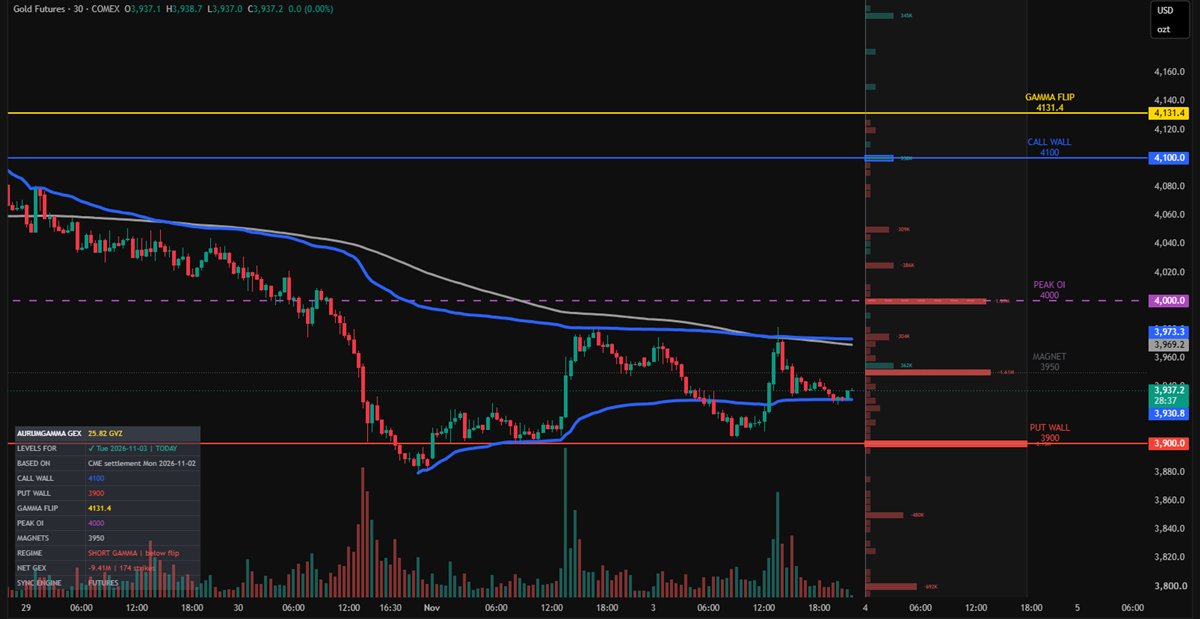
V40 draws net gamma exposure at every COMEX strike in a panel next to your candles, with the call wall, put wall, gamma flip and peak open interest on the chart and a levels table that confirms your levels are today’s.

AurumGamma Pro HUD V40 on a TradingView gold futures 30-minute chart: GEX profile panel right of the candles, call wall 4100, put wall 3900, gamma flip 4131.4, levels table bottom left
Gold futures (GC), 30 min · levels for Tue 3 Nov 2026 from the CME settlement of Mon 2 Nov.
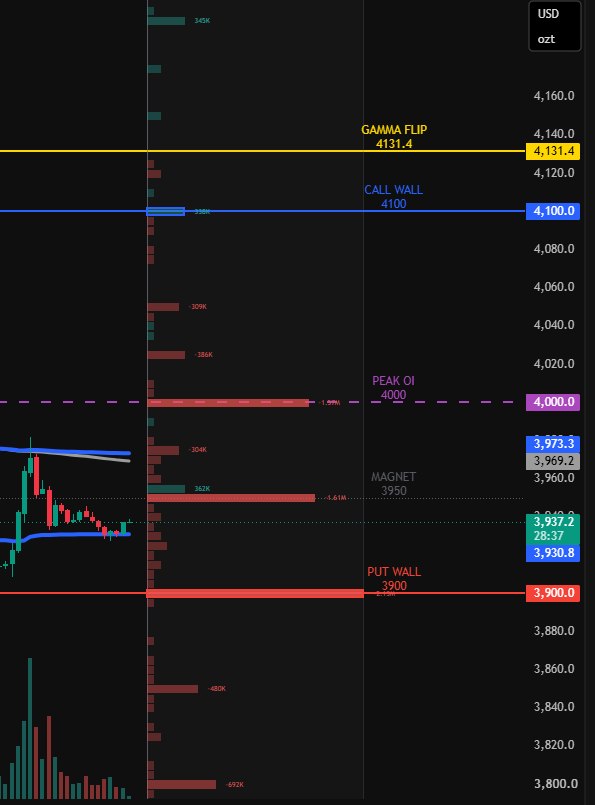
Close-up of the V40 GEX profile: one bar per strike, red for negative and green for positive gamma, the largest strikes labelled with their value
The GEX profile. One bar per strike. Green = positive dealer gamma (moves tend to be absorbed), red = negative (moves tend to accelerate). Longer, more solid bars mean bigger exposure; the walls are outlined and the largest strikes show their value.
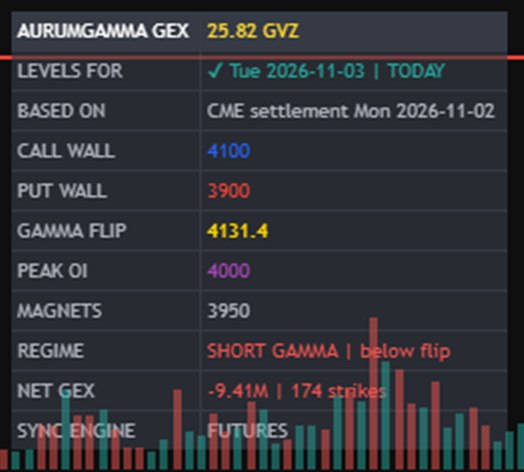
Close-up of the V40 levels table: levels for Tue 2026-11-03 marked TODAY, based on the CME settlement of Mon 2026-11-02, with call wall, put wall, gamma flip, peak OI, magnets, regime and net GEX
The levels table. Which trading day your levels are for and the CME settlement they come from: green TODAY when current, red NOT TODAY when you need to copy fresh data. Then every level, the gamma regime and net GEX.
  1. On the gamma dashboard, press Copy for TradingView (Pro: 3-Months Pro, Annual Pro and Lifetime Pro passes).
  2. In TradingView, open the indicator’s settings and paste into the DAILY DATA box.
  3. Copy again each morning after the daily gamma update; the table turns red when you need to.
New • MetaTrader 5 EA 2.00

The GEX profile inside MetaTrader 5

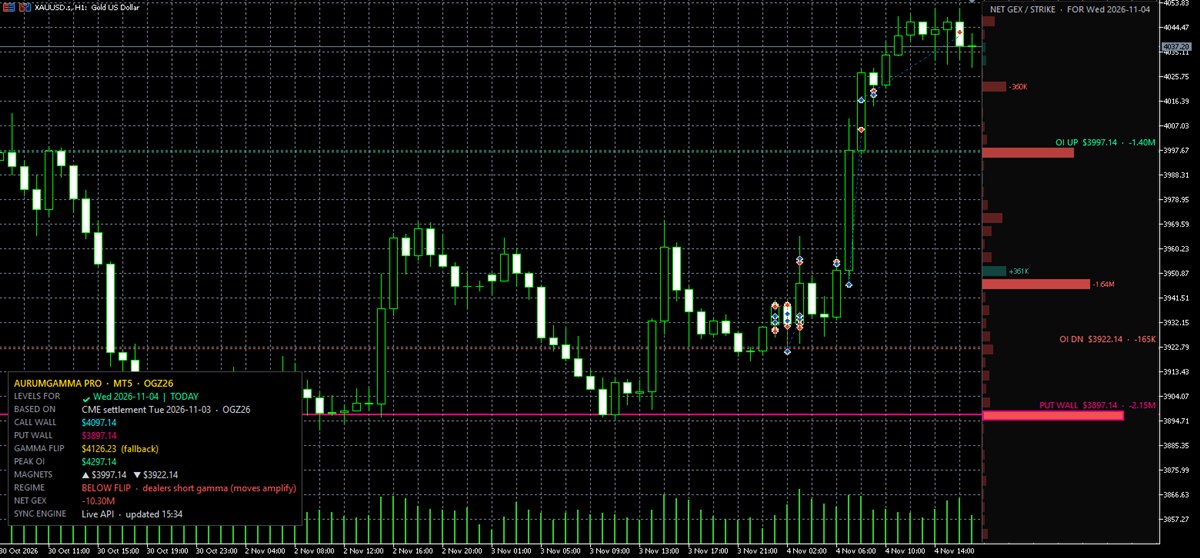
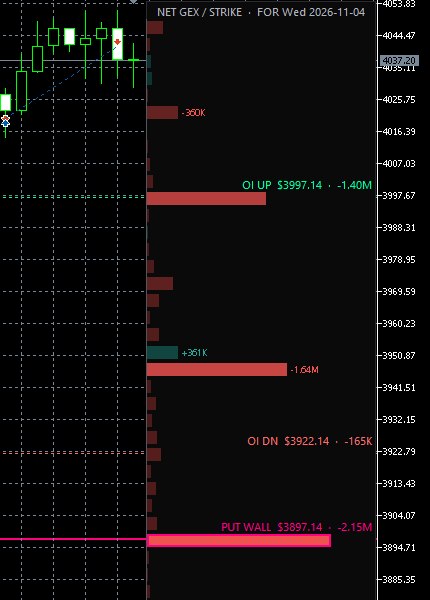
EA 2.00 draws net gamma exposure at every strike against the MT5 price scale and names each level inside the profile. Everything loads automatically from your whitelisted account; there is nothing to copy.

AurumGamma EA 2.00 on a MetaTrader 5 spot gold 1-hour chart: GEX profile against the price scale with OI UP, OI DN and PUT WALL named inside it, levels table bottom left
Spot gold (XAUUSD), 1 hour · levels for Wed 4 Nov 2026 from the CME settlement of Tue 3 Nov, converted to spot.
Close-up of the MT5 GEX profile: one bar per strike, the put wall bar outlined and labelled PUT WALL 3897.14 with -2.15M, OI UP and OI DN labelled with their values
Levels inside the profile. One bar per strike: green = positive dealer gamma, red = negative, stronger color = bigger exposure. Each level sits on its strike with its name and value, for example PUT WALL $3897.14 · -2.15M.
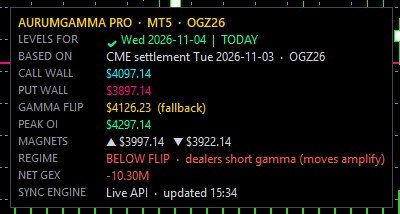
Close-up of the MT5 levels table: levels for Wed 2026-11-04 marked TODAY, based on the CME settlement of Tue 2026-11-03, with call wall, put wall, gamma flip, peak OI, magnets, regime and net GEX
The levels table. The trading day the levels are for (green TODAY, red NOT TODAY), the CME settlement they come from, every level, the regime from the live price against the flip, and net GEX.
  1. Whitelist your MT5 account and download AurumGamma_V2.ex5 in your User Dashboard (Pro: 3-Months Pro, Annual Pro and Lifetime Pro passes). Already using an older version? Download it again and replace the file.
  2. Attach it to your XAUUSD / GOLD chart. The profile and the table appear on their own and refresh every 30 minutes.
New • NinjaTrader 8 indicator 2.00

The GEX profile inside NinjaTrader 8

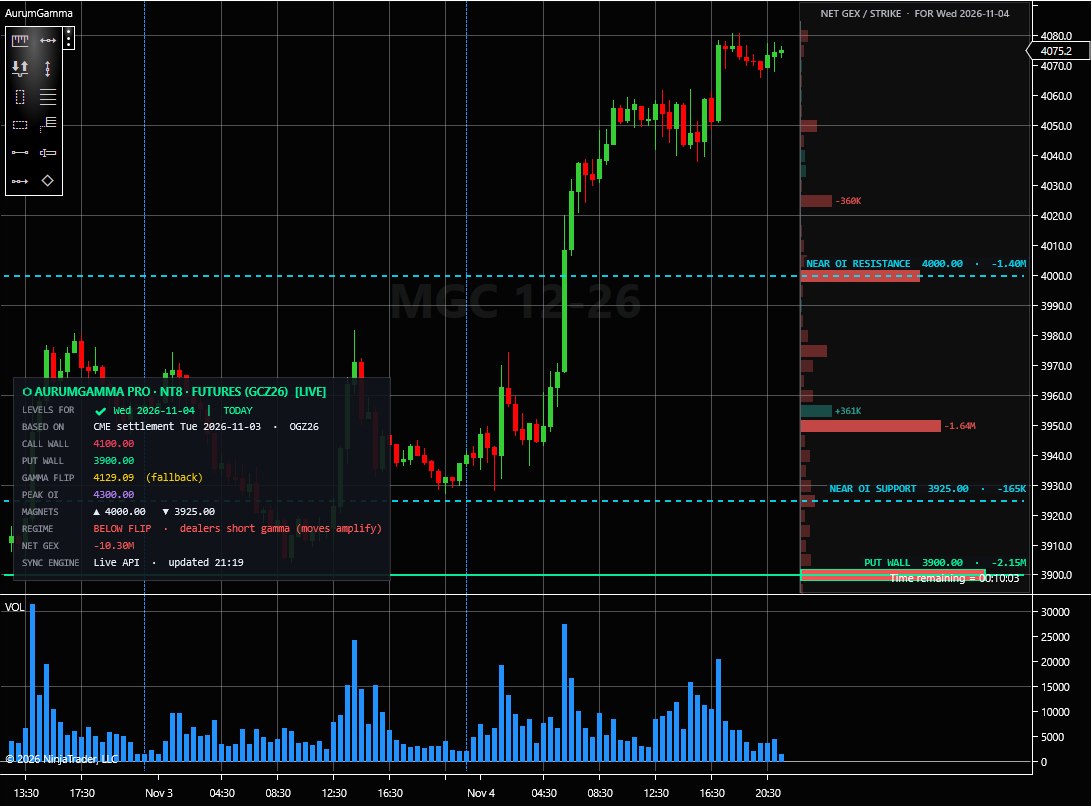
Indicator 2.00 draws net gamma exposure at every strike against the NinjaTrader price scale and names each level inside the profile. On GC / MGC it uses the exact CME strikes, on XAUUSD it converts them to spot. Everything loads automatically on your bound machine; there is nothing to copy.

AurumGamma indicator 2.00 on a NinjaTrader 8 micro gold futures (MGC 12-26) 30-minute chart: GEX profile against the price scale with NEAR OI RESISTANCE, NEAR OI SUPPORT and PUT WALL named inside it, levels table bottom left
Micro gold futures (MGC 12-26), 30 min · levels for Wed 4 Nov 2026 from the CME settlement of Tue 3 Nov.
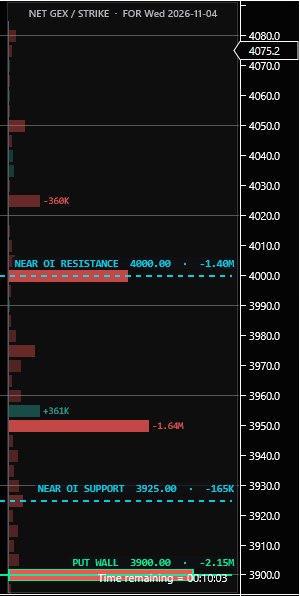
Close-up of the NinjaTrader GEX profile: one bar per strike, the put wall bar outlined and labelled PUT WALL 3900.00 with -2.15M, NEAR OI RESISTANCE and NEAR OI SUPPORT labelled with their values
Levels inside the profile. One bar per strike: green = positive dealer gamma, red = negative, stronger color = bigger exposure. Each level sits on its strike with its name and value, for example PUT WALL 3900.00 · -2.15M.
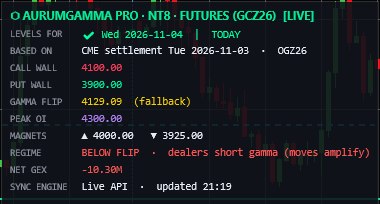
Close-up of the NinjaTrader levels table: levels for Wed 2026-11-04 marked TODAY, based on the CME settlement of Tue 2026-11-03, with call wall, put wall, gamma flip, peak OI, magnets, regime and net GEX
The levels table. The trading day the levels are for (green TODAY, red NOT TODAY), the CME settlement they come from, every level, the regime from the last price against the flip, and net GEX. It also warns when your chart is a different contract month.
  1. Download AurumGammaNT8_V2.zip in your User Dashboard (Pro: 3-Months Pro, Annual Pro and Lifetime Pro passes) and import it with Tools → Import → NinjaScript Add-On.... Already using an older version? Download it again and import it over the old one.
  2. Add AurumGamma to your GC, MGC or XAUUSD chart (Ctrl+I). The profile and the table appear on their own and refresh every 15 minutes.

Prefer In-Browser Charting? Use the Live Confluence Chart

The AurumGamma Dashboard includes a built-in live COMEX Futures candlestick chart with 5 timeframes (15M to 1D) and pre-rendered institutional levels—zero external indicator setup required.

Open Dashboard Chart →
02

Which pass includes the indicators

The 3-Months Pro, Annual Pro and Lifetime Pro passes include all three platforms. Longer passes connect more MetaTrader 5 accounts and NinjaTrader 8 machines. The 1-Month Pass covers the dashboards only.

Indicator1-Month3-MonthsAnnualLifetime
TradingView Pine Script HUD (V40)With the dashboard’s copy buttons—
MetaTrader 5 (MT5) EAAccounts you can whitelist—123
NinjaTrader 8 (NT8) Add-OnMachines you can connect—123

Passes are one-time payments. Prices and the full comparison are on the pricing page.

03

Platform Feature & Capability Comparison

Who each indicator is built for, what it plots on and how it gets the day’s levels.

Feature / CapabilityTradingView HUDMetaTrader 5 EANinjaTrader 8 Add-On
Primary Target TraderTechnical Chartists & Multi-Asset TradersSpot Forex / CFD Traders (Prop & Live)Futures Day Traders (Prop & Live)
Supported InstrumentsGC1!, TVC:GOLD, XAUUSDXAUUSD, GOLD (Spot Brokers)GC, MGC, QO, YG, XAUUSD
Data Synchronization1-Click Clipboard Sync from MatrixAutomated HTTPS WebRequest to Cloud APIAutomated Machine ID Cloud Sync & Direct2D
Chart Theme AdaptabilityCustomizable Colors & OpacityAuto Luminance (Dark / White MT5)Hardware SharpDX Theme-Aware
04

What the indicators plot

Three quantitative layers, drawn the same way on every platform.

1. Institutional Call & Put Liquidity Walls

Dynamically plots horizontal price levels representing the Call Wall (primary resistance ceiling) and Put Wall (primary support floor) in CME Gold options. These levels isolate where dealer delta/gamma hedging activity is most concentrated.

2. Gamma Flip Neutral Pivot Zone

Identifies the threshold line where market makers transition between Long Gamma (volatility suppression, mean reversion) and Short Gamma (accelerated directional momentum and breakout expansion).

3. Key Gamma Magnets & High OI Strikes

Projects peak open interest strike magnets (all expiries) and top net GEX concentration pins directly onto your screen, accompanied by an on-chart live institutional spread and volatility HUD.

05

Quick 3-Step Setup for Any Platform

Everything starts in your User Dashboard: open the script, whitelist your MT5 account or download your NT8 add-on.

TradingView

TradingView Setup

  1. Sign in to your Pro account and open your private script access in the User Dashboard.
  2. Click "Add to Favorite Indicators" on TradingView.
  3. Open your chart, add AurumGamma Pro HUD V40 from Favorites, press "Copy for TradingView" on the gamma dashboard and paste into the indicator’s DAILY DATA box. The table shows TODAY in green when the levels are current. If the profile is cut off, set Chart settings → Canvas → Margins → Right to about 50 bars.
MetaTrader 5

MetaTrader 5 Setup

  1. Whitelist your numeric MT5 Account Login ID in the User Dashboard and download AurumGamma_V2.ex5.
  2. Place the file in MQL5 → Experts and refresh Navigator.
  3. Allow WebRequest for https://aurumgamma.cloud and attach the EA to your XAUUSD chart. EA 2.00 shows the GEX profile and the levels table; on an older version, download again and replace the file.
NinjaTrader 8

NinjaTrader 8 Setup

  1. Download your stamped AurumGammaNT8_V2.zip archive from the User Dashboard.
  2. In NinjaTrader 8, click Tools → Import → NinjaScript Add-On....
  3. Open any GC, MGC, or XAUUSD chart and press Ctrl+I to add AurumGamma. Auto-binds on first load. Indicator 2.00 shows the GEX profile and the levels table; on an older version, download again and import it over the old one.
06

Visual Overlay Only: No Automated Orders

Visual analytics only, on every platform.

All AurumGamma indicators across TradingView, MetaTrader 5, and NinjaTrader 8 are strictly visual analytical HUDs. They never execute trades, place automated orders, or interact with broker order routing. If you trade an evaluation or a funded account, check your prop firm's rules on indicators.

Zero Execution Risk • Zero Trade Placement • Pure Quantitative Decision Intelligence

07

Frequently asked questions

Platforms, spot conversion and prop-firm rules.

Which trading platforms does the AurumGamma Indicators Suite support?

The AurumGamma Indicators Suite supports TradingView (Pro HUD V40 Pine Script with GEX profile), MetaTrader 5 (MT5 EA 2.00 with GEX profile), and NinjaTrader 8 (NT8 indicator 2.00 with GEX profile) for both COMEX Gold Futures (GC/MGC) and Spot Gold (XAUUSD).

How does AurumGamma convert CME Gold Futures strikes to Spot XAUUSD?

AurumGamma automatically calculates the live EFP (Exchange for Physical) cost-of-carry basis between COMEX GC futures and spot XAUUSD, projecting institutional Call Walls, Put Walls, and Zero Gamma Flip levels onto your spot chart with tick-level accuracy.

Are AurumGamma indicators safe for funded prop firm accounts?

Yes. AurumGamma indicators for TradingView, MetaTrader 5, and NinjaTrader 8 are visual overlays only: they draw levels on your chart, never place, modify or close orders, and have no access to your account. Most prop firms allow visual indicators; check your firm's rules before you trade.

Ready to Upgrade Your Chart Setup?

The 3-Months Pro, Annual Pro and Lifetime Pro passes include all three indicators: 1, 2 or 3 MT5 accounts and NT8 machines, by pass. All updates included.